How sign in consent works
Vellum Sign In Codes
Vellum sends one text message, a one time sign in code, only when a person asks for it in the app. This page shows exactly how consent is collected.
Step 1: the person asks for a code
On the sign in screen of the Vellum iOS app, the person enters their own mobile number and taps Text me a code. No text is sent unless they do this.
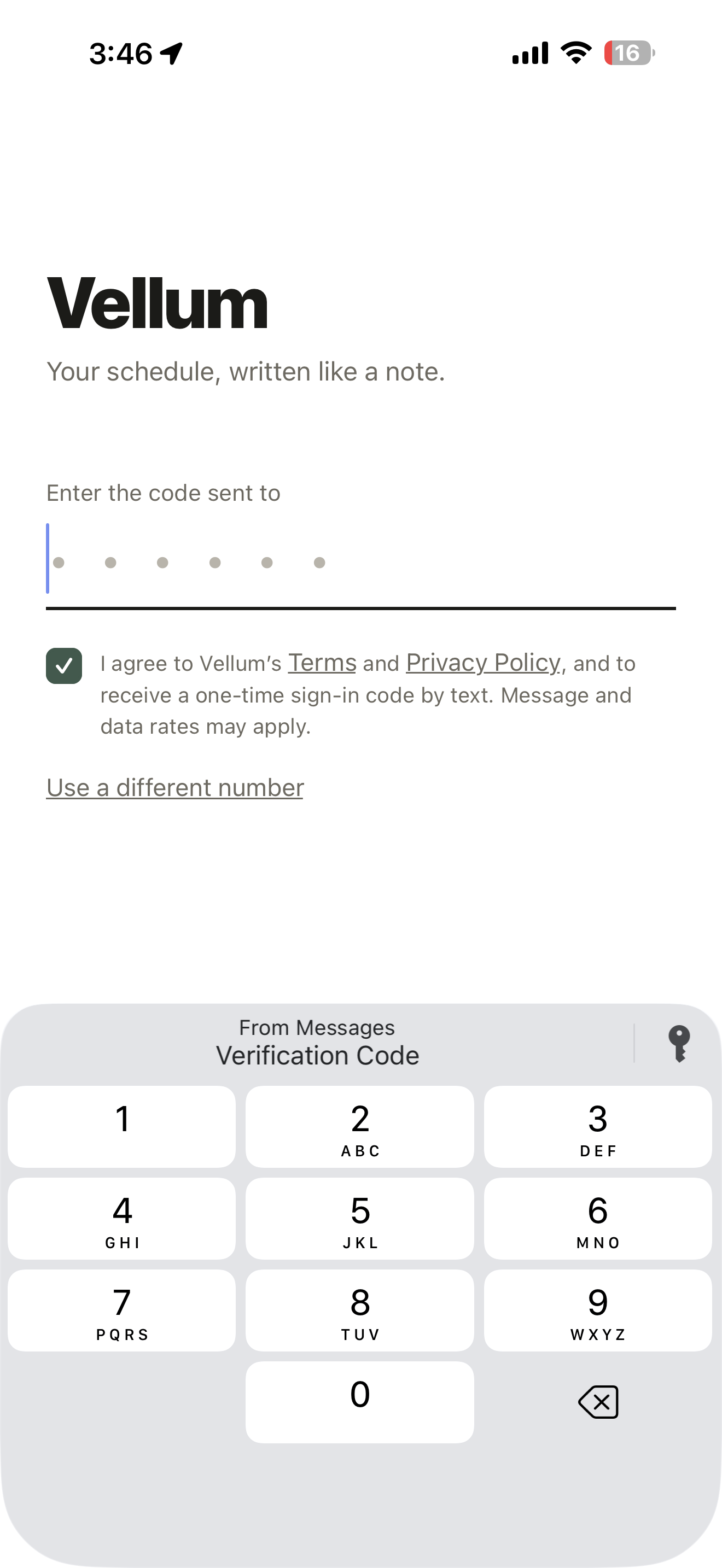
Step 2: the person agrees before signing in
On the next screen, a required checkbox must be checked before the code can be verified. It reads:
I agree to Vellum’s Terms and Privacy Policy, and to receive a one-time sign-in code by text. Message and data rates may apply.
The words Terms and Privacy Policy link to our Terms of Service and Privacy Policy.
Step 3: the code arrives
The person receives one text containing their code and enters it in the app. That is the only message sent. We send no marketing or promotional texts. Message frequency is one text per request. Reply STOP to opt out or HELP for help, or contact sam@vellumscheduler.com.